Model building demand
Define floors, entrances, basements, population, traffic patterns, and demand assumptions before comparing alternatives.

Elevator Traffic Analysis Software
VT Planner helps consultants, manufacturers, developers, and technical teams run elevator traffic analysis and simulation, model building demand, compare elevator configurations, and export traceable elevator traffic reports.
Traffic Analysis
Keep building assumptions, elevator group inputs, analytical calculations, simulation runs, alternatives, and reports in one project workflow. Review RTT, interval, and handling capacity beside waiting time, journey time, queues, and percentiles.
Define floors, entrances, basements, population, traffic patterns, and demand assumptions before comparing alternatives.
Review car count, capacity, speed, door timing, dispatch assumptions, RTT, interval, and handling capacity in the same study context.
Inspect waiting time, journey time, queues, percentiles, and run-to-run variation when capacity metrics are not enough.
Keep assumptions, alternatives, run history, charts, and summary metrics tied to report-ready traffic studies.
One Technical Workspace
Elevator planning decisions often move between spreadsheets, local notes, screenshots, PDFs, and isolated simulation runs. VT Planner keeps the scenario, assumptions, alternatives, runs, and reports together so each recommendation is easier to compare and revisit. The workspace keeps elevator capacity planning metrics and passenger service metrics visible in the same record.

Capabilities
Use elevator traffic analysis software workflows to review RTT, interval calculation, handling capacity, waiting time analysis, journey time, and criteria checks.
Model passengers, calls, boarding, queues, car movement, traffic patterns, and elevator dispatch behavior when averages are not enough.
Use multiple simulation runs to review confidence intervals, percentiles, convergence, and run-to-run variability.
Keep buildings, service zones, elevator alternatives, run history, assumptions, and report outputs tied to the same study record.
Compare car count, capacity, speed, dispatch strategy, and elevator configuration alternatives under the same building assumptions.
Export calculation, simulation, statistical validation, and batch comparison reports with traceable inputs, metrics, charts, and summaries.
Workflow
Use analytical calculation when speed matters. Move into simulation and statistical validation when passenger behavior, dispatch strategy, or variability changes the decision.
Define floor heights, entrances, basements, population, service zones, and traffic patterns for the project context.
Set cars, capacity, speed, acceleration, door timing, effective capacity, and dispatch assumptions for elevator capacity planning.
Use analytical calculation for early sizing, then simulation and statistical validation when the decision needs deeper confidence.
Review metrics, compare elevator alternatives, keep run history, and export a technical report tied to the exact assumptions used.
Reports
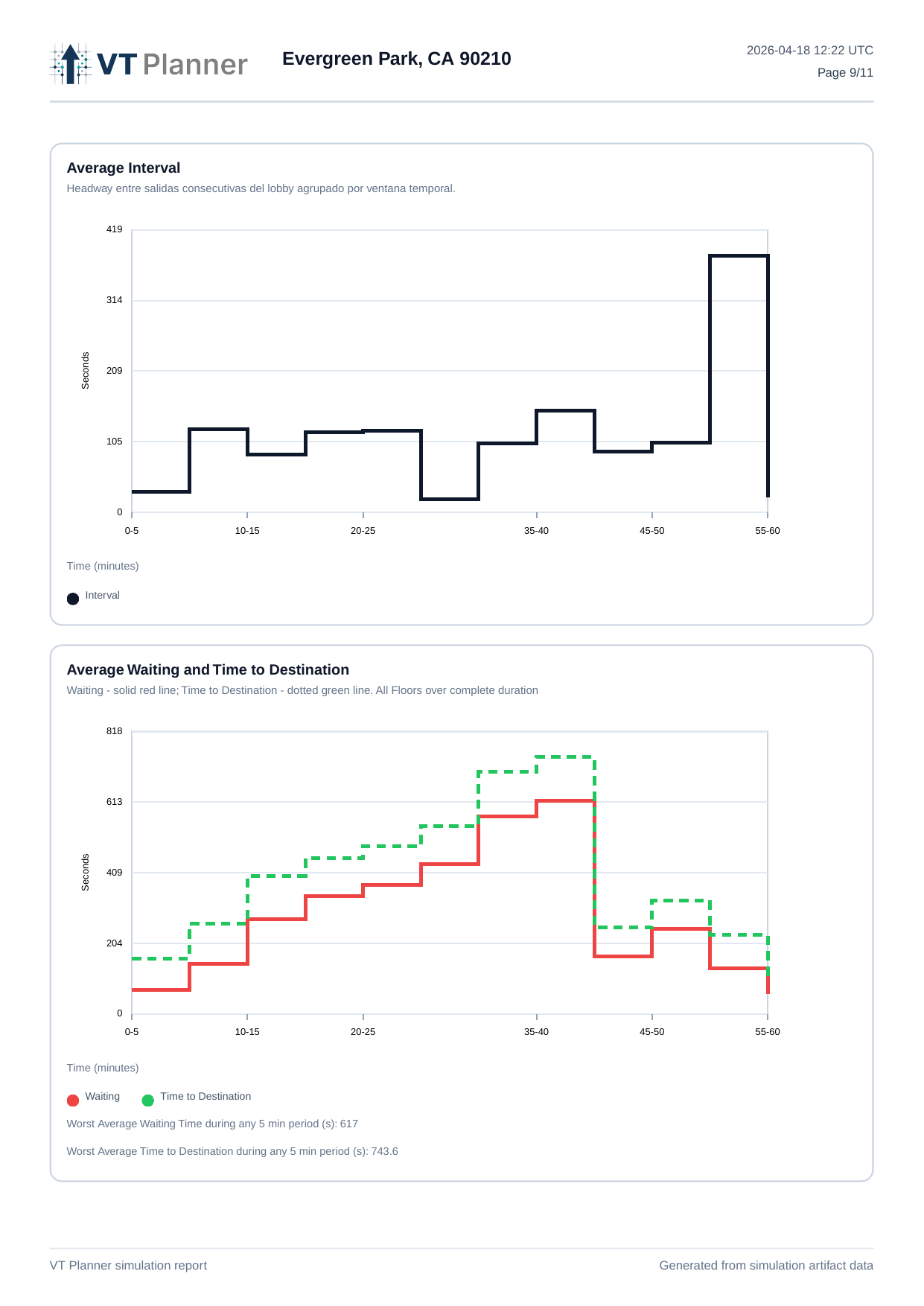
Export report-ready material for calculation, simulation, statistical validation, and batch comparison workflows. Reports can include building context, elevator group assumptions, service zones, executive summaries, metric tables, percentiles, charts, and run history.

Typical comparison inputs
Use Cases
Compare elevator count, capacity, and speed before the vertical core is locked, using elevator capacity planning metrics alongside simulation results.
Prepare structured studies for offices, residential buildings, hotels, hospitals, and mixed-use projects.
Evaluate whether a proposed configuration changes service quality before committing to a modernization path.
Compare hall-call and destination-based elevator dispatch strategies by scenario, not as a blanket assumption.
Review entrances, basements, uneven populations, service zones, and mixed traffic demand in the same project record.
Technical Note
A short technical note on when analytical calculation is enough, when simulation adds value, and why multiple simulation runs can make close elevator alternatives easier to compare.
Read Elevator Simulation NotePricing
Start with a 30-day trial, then choose the plan that matches your study volume and support needs.
Free Trial
Create an account and start a 30-day trial. No credit card required.
Pro
For professionals and teams running recurring elevator traffic studies.
Max
For teams with large study volume, onboarding needs, or custom commercial terms.
Annual Pro pricing is USD 500/year. Max plans are quoted for teams with larger commercial or onboarding requirements. See the Refund Policy.
FAQ
VT Planner is a web-based software product for elevator traffic analysis, simulation, and project-based comparison of elevator alternatives.
Yes. VT Planner is built around both analytical traffic studies and deeper simulation workflows so teams can match the level of rigor to the decision in front of them.
Elevator traffic analysis is the process of evaluating how well an elevator system can serve building demand. It typically involves metrics such as interval, handling capacity, waiting time, journey time, and overall service quality under defined traffic patterns.
Analytical calculation is useful for fast early-stage evaluation and sizing. Simulation is used when teams need a more dynamic view of performance under realistic operating conditions, passenger flows, and dispatch behavior.
Simulation is especially useful when a project needs deeper validation, more complex traffic patterns, or greater confidence in how an elevator group may perform over time rather than through simplified assumptions alone.
The product is aimed at vertical transportation consultants, elevator manufacturers and contractors, developers, design teams, and modernization teams that need a more structured basis for traffic decisions.
Depending on the workflow, teams can review service KPIs, waiting-time distributions, scenario comparisons, and report-oriented outputs tied to the exact run behind them.
Spreadsheets can still help with isolated calculations, but they are weaker when teams need project memory, comparable alternatives, traceable run history, and cleaner reporting.
Yes. VT Planner is structured around projects that can store multiple elevator configurations under the same building context, making comparison more consistent and easier to review.
Yes. VT Planner can support modernization workflows by helping teams compare different elevator configurations and assess how performance may change before moving forward with a recommendation.
Yes. VT Planner is a web-based platform, which makes it easier to access structured study workflows and project records without depending on a desktop-only setup.
Yes. In many markets, elevator traffic analysis is described as lift traffic analysis, lift traffic simulation, or lift traffic simulation and analysis. VT Planner uses elevator in most product copy, but the workflow applies to vertical transportation planning for lift and elevator groups under explicit assumptions.
Request a Demo
Send project context and we can tailor the walkthrough around sizing, simulation, statistical validation, alternative comparison, or report generation.
Prefer email? info@vtplanner.com