
Documentation
VT Planner Zoning and Transfers Guide
Learn how to configure elevator service zones, car assignments, entrance coverage, transfer floors, and interzonal passenger trips.
The service model determines which cars can serve each floor. Start with Full group service; use Manual zoning when the operating concept genuinely divides cars or floors.
Full Group Service
Every car serves the full set of served floors. This is the clearest baseline for comparing the effect of a zoning proposal.
Configure Manual Zoning
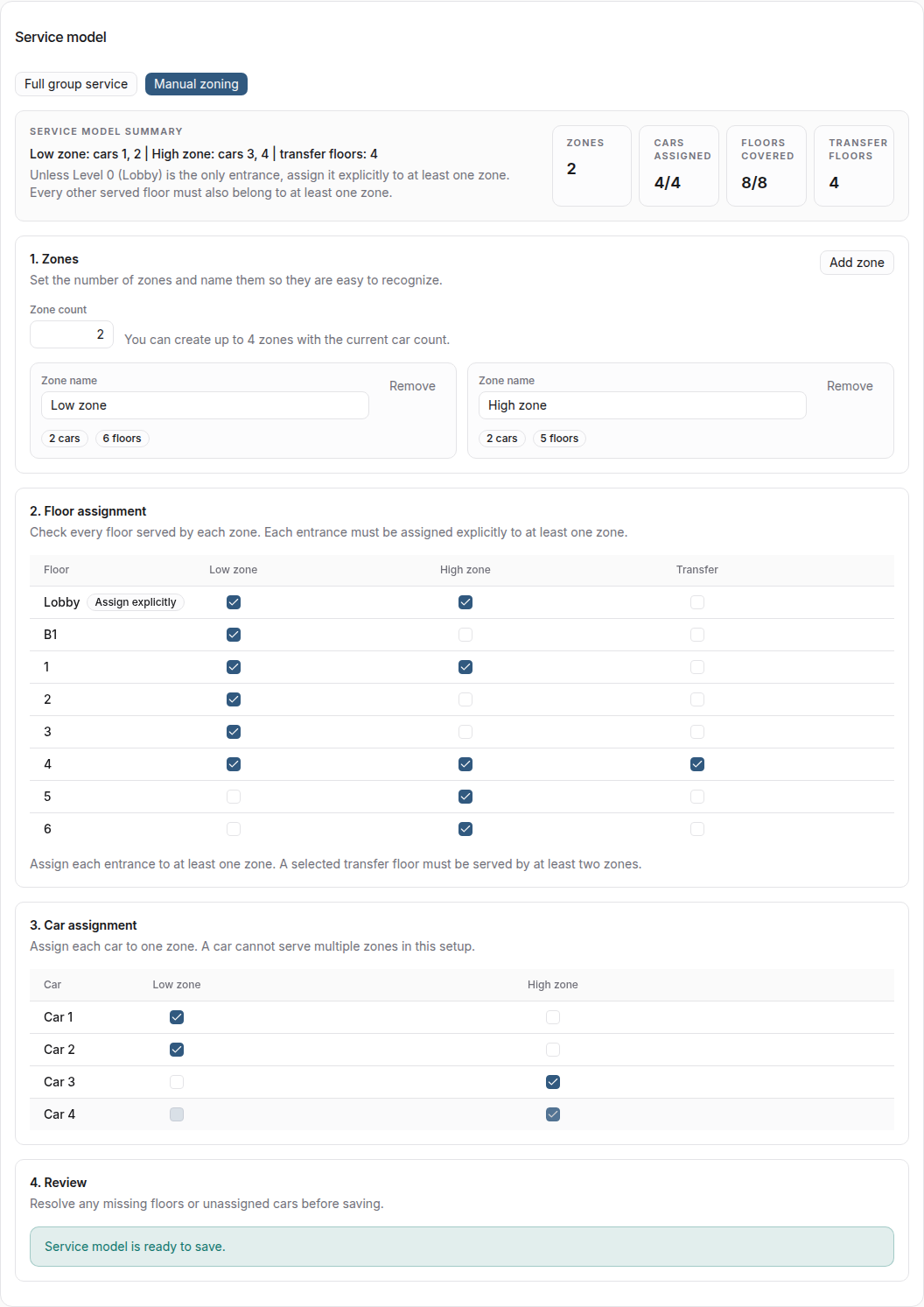
The editor has four sections:
- In
Zones, create and name each service zone. - In
Floor assignment, select the floors served by each zone. - In
Car assignment, assign every car to exactly one zone. - Open
Reviewand correct every coverage or assignment issue.
A valid assignment has at least one car per zone, no car in two zones, and coverage of every required floor. A floor may belong to more than one zone when common or overlapping service is intentional.
Entrance Coverage
The treatment of Level 0 depends on the building:
- when
Level 0 (Lobby)is the only entrance, it is included implicitly in every zone; - when the building has multiple entrances, each entrance—including Level 0—must be assigned explicitly to at least one zone.
This distinction prevents a multiple-entrance setup from appearing serviceable while one access floor has no serving zone.
Direct Trips and Transfer Floors
A trip is direct when one zone serves both origin and destination. If no single zone covers both, a configured Transfer floor can connect the two legs in Simulation.
A transfer floor must exist in the saved building and be served by at least two relevant zones. For example:
- a passenger travels from a low-floor origin to the shared transfer floor;
- the passenger alights and waits again;
- a car in the second zone completes the trip to the high-floor destination.
Transfer waiting is part of the passenger outcome. Compare journey time, high percentiles, completion, and queue behavior—not only interval or car travel time.
Calculation or Simulation
Use Calculation for a rough analytical screen of full-group service and limited zoning assumptions. Use Simulation to represent passengers alighting, requeueing, and boarding at a transfer floor.
Use Simulation as the primary method when:
- cars serve different floor sets;
- the building has multiple entrances;
- a non-lobby transfer floor is part of the trip;
- dispatch behavior affects the conclusion;
- the demand includes origin-destination pairs across zones;
- transfer waiting and passenger distributions matter.
If Calculation reports that transfer floors are incompatible, save or select a separate setup without transfers for a deliberately simplified analytical screen, or use Simulation for the transfer scenario. Do not remove a real transfer assumption merely to clear validation.
Analysis Preflight
A saved setup is not necessarily ready for every demand. The launch preflight checks whether the setup is ready and flags zone-coverage or scenario-compatibility problems.
Simulation, Multi-run, and Simulation batch validate the selected demand against the available service paths. Advanced demand uses the applied OD rows. Standard and Custom demand use the possible trips for the selected traffic-pattern family, including directions displayed at 0%.
If VT Planner reports an unserviceable trip or zoning problem, confirm:
- coverage for every served and entrance floor;
- each car assigned to exactly one zone;
- transfer floors shared by the required zones;
- service paths for every relevant profile or Advanced OD row;
- enough cars in each batch variant for every assignment and customization.
Compare a Zoning Proposal
- Save a full-group baseline and the zoned alternative against the same building version.
- Use equivalent demand, duration, dispatcher, and simulation policy.
- Confirm both runs completed the requested horizon.
- Compare waiting time, time to board, journey time, completion rate, queues, and tail percentiles.
- Inspect replay when the result suggests transfer or serviceability problems.