
Documentation
VT Planner Operational Energy Guide
Configure VT Planner energy assumptions, include energy analysis in simulations, and interpret electrical balance, regeneration, and normalized results.
VT Planner can estimate operational energy during a simulated traffic period. The estimate combines the saved equipment assumptions with the modeled car movements, doors, idle time, standby time, and passenger service generated by the simulation.
When to Use It
Use energy analysis when you need to compare the modeled operational effect of alternatives such as drive type, regenerative capability, standing-power assumptions, traffic, or elevator-group configuration.
For a fair comparison, keep the building, demand, duration, seed policy, dispatch controls, and energy assumptions equivalent, varying one study variable at a time. Review energy and traffic performance together to identify alternatives that meet both service and energy objectives.
Configure the Setup
Open Elevator setups, edit or create a setup, and turn on Configure in the optional Energy model card.
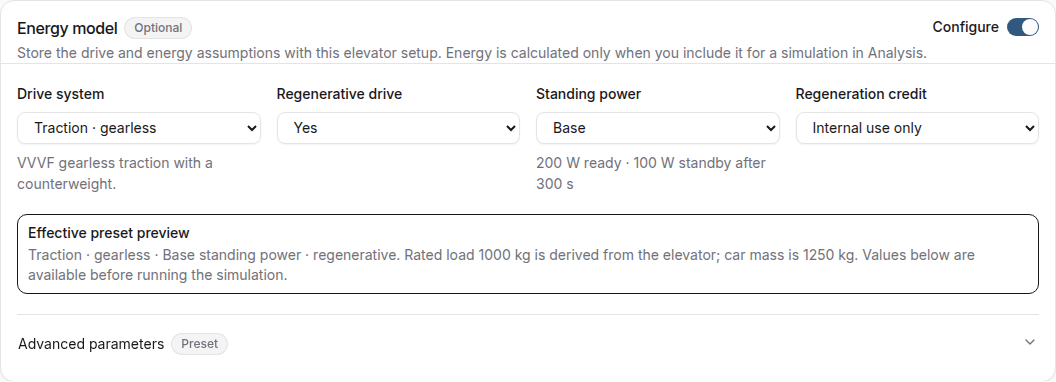
| Choice | How to use it |
|---|---|
Drive system |
Select Traction · gearless, Traction · geared, Hydraulic · direct, or Hydraulic · roped 2:1 to match the modeled equipment. |
Regenerative drive |
For traction systems, Yes models energy recovery, No uses a non-regenerative model, and Unknown · assume no regeneration applies the same conservative assumption. Hydraulic choices use the non-regenerative model. |
Standing power |
Select the Low, Base, or High preset that best represents ready and standby consumption. |
Regeneration credit |
Internal use only credits recovered energy only against concurrent group demand. Credit exported energy also credits modeled export to the grid. |
Review Effective preset preview before saving. The rated load comes from the elevator setup; the preview and Advanced parameters show the other effective assumptions.
Advanced Parameters
Use Advanced parameters when reliable project, supplier, or manufacturer data is available. Enable Review or override preset parameters, enter overrides in the displayed units, and review the effective values again after changing drive type.
Include Energy in a Run
The saved energy model becomes available as a per-run option in Analysis.
- In
Analysis, select a setup with a configured energy model. - Choose
Simulation,Multi-run simulation, or a Simulation batch. - Enable
Include energy analysis. - Confirm that the
Launchsummary saysEnergy analysisisIncluded. - Start the run.
Energy results are available for Simulation, Multi-run, and Simulation batch. Energy analysis cannot be combined with Different settings by car; use a setup without car-specific differences for an energy study. Enable Include energy analysis for each new launch from Analysis; Run again keeps the saved run choice.
Read the Result
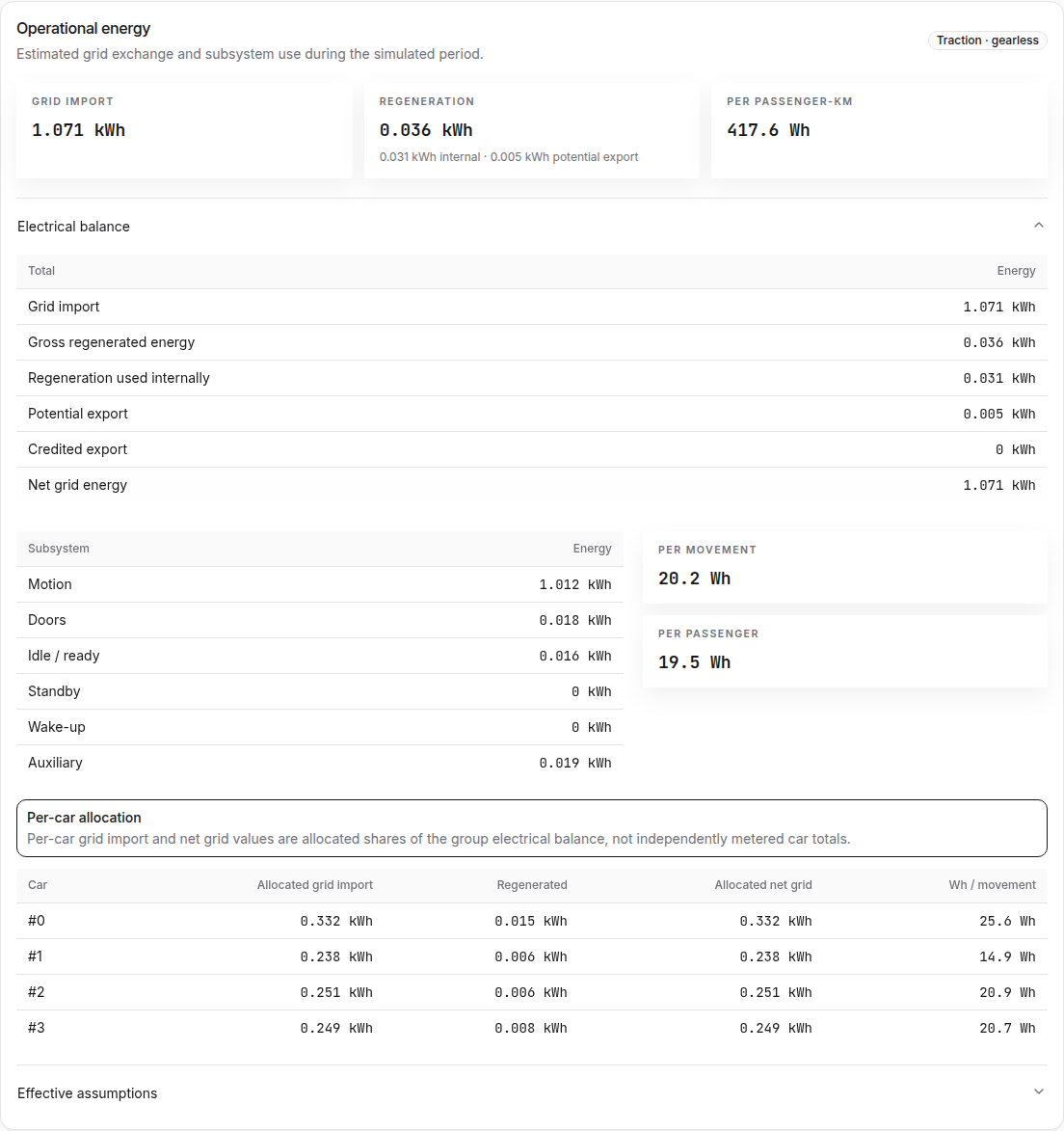
The Operational energy result includes:
- a primary total of
Grid import, orNet grid energywhen exported energy is credited; - gross regenerated energy, internal use, potential export, and credited export;
- a subsystem breakdown for motion, doors, idle or ready, standby, wake-up, and auxiliary use;
- normalized values per movement, passenger, and passenger-kilometre;
Effective assumptionsused for the completed run.
Open Electrical balance to reconcile the totals. Potential export is energy available after internal use; it reduces the primary net total only when Credit exported energy was selected.
For a group, per-car grid-import and net-grid values are allocated shares of the group electrical balance, not independently metered car totals. Use the modeled group total when reading the group balance.
How Energy Is Accounted For
- the motion breakdown uses signed values, with negative values representing recovered electrical energy;
- wake-up energy is counted as grid import when a car reactivates after standby;
- the hydraulic estimate covers modeled travel, doors, ready and standby states, wake-up, and configured arrival levelling. Dedicated anti-creep or releveling cycles after arrival are not represented;
- conventional hydraulic presets are intended for travel up to 18 m and speeds up to 0.63 m/s. Higher values prompt an applicability and cooling review, with preset support extending to 1.0 m/s.
For project-specific decisions, replace preset assumptions with manufacturer or measured data. Audit data records the applicable model notes with the effective assumptions.
Multi-run and Batch Results
Multi-run reports show energy means and confidence intervals across valid runs, describing run-to-run sampling variation under the selected assumptions. These intervals do not include uncertainty in the physical preset or equipment data.
A Simulation batch provides an Energy batch comparison alongside a separate traffic ranking. Review both tables and confirm that the compared cases use compatible assumptions before selecting an alternative.
Reports and Audit Data
Supported PDFs and audit-data exports include energy results, effective assumptions, and units for runs launched with Include energy analysis. Applicable model notes and warnings are preserved in the audit data; they are not shown in on-screen results or PDF output.